Authenticated Boot, Finally
TL;DR
I finally found a few hours to setup "secure boot" on my System76 laptop using my own securely-generated Platform Keys. Due to a consumer processor, we achieve HSI Level 2 and 80% of HSI Level 3, with extras.
The Details
My approach to confidential computing involves layers, like an onion. Here's the entire stack I envision:
- "Secure Boot" with UEFI and self-generated Platform Key.
- OPAL 2.0 Secure Storage in hardware on NVMe drive.
- LUKS 2 encrypted storage with token and password-based authentication.
- Hardware encrypted memory.
- Secured, authenticated running kernel.
- Running sensitive applications in a trusted execution environment (TEE).
In theory, this setup provides encryption at rest via the storage, authenticated boot via the UEFI secure boot, and encrypted computation in the TEE. My network communications are wrapped in a self-managed Wireguard VPN across 802.11ac encrypted WiFi or unencrypted Ethernet. I use hardware token-authorized/stored ssh keys, TLS keys, etc. Another way to say this is zero-trust, but we're not fully there.
Today, we're going to focus on the secure boot with UEFI on linux with my laptop. First off, we dove into the UEFI firmware to see if we can wipe the default/manufacturer Platform Keys. The original concept comes from Microsoft as a way to make people think Windows can be secure; hence the marketing name, secure boot. This also assumed Microsoft would control the keys and only allow what they want. Fortunately, this is not the case.
This is a pretty good guide for using systemd-boot with UEFI secure boot. After generating your own RSA 2048-bit keys and putting them in the EFI partition, the next step is to wipe the Platform Keys in the UEFI firmware and enroll our own. This allows us to control the keys and what is signed by them. Here's how it started:
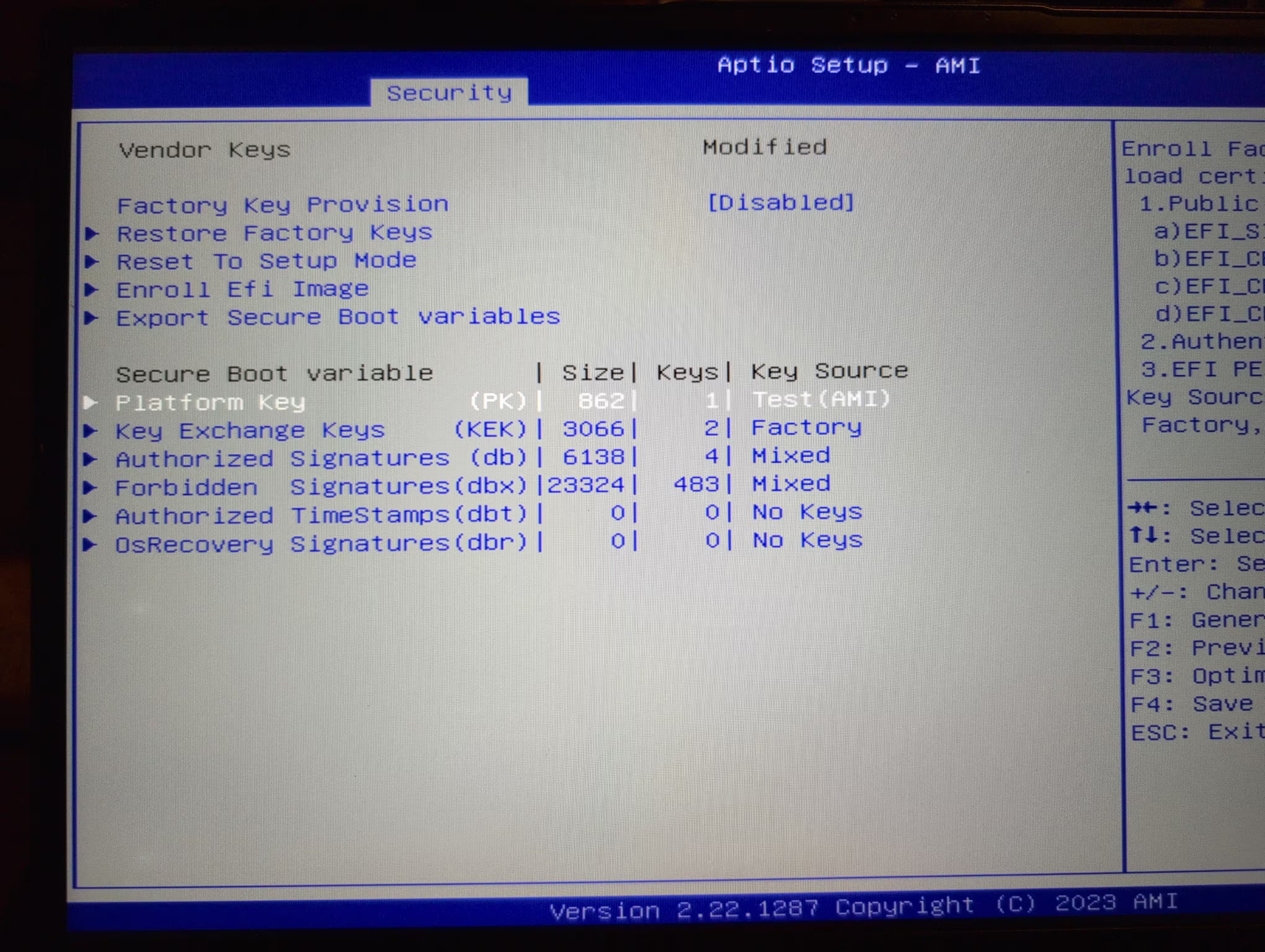
The "secure boot" is tied to a Platform Key. This is the root of trust for everything afterwards. We have the Platform Key with a key source of "Test (AMI)". Ugh, horrible. The factory Key Exchange Keys (KEK) are set at the factory. The db and dbx are updated for banned/blocked/allowed signatures tied to the PK and KEK, roughly. Fundamentally, the db/dbx updates are signed by Microsoft who gets final say in what's included. My goal is to get rid of this dependency because I can and should.
Highlight of the default factory Platform Key:
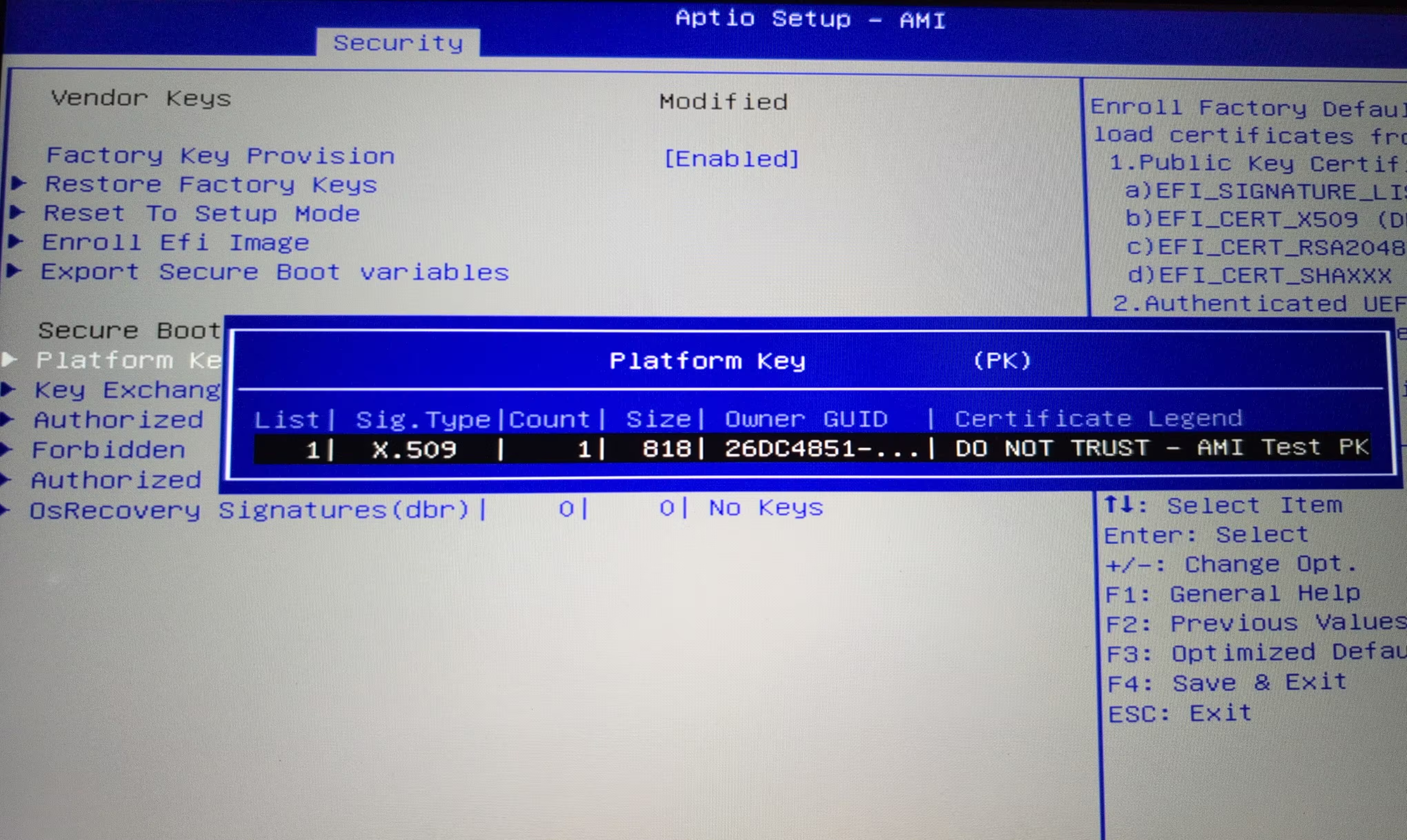
Notice the Certificate Legend. Sigh. Now you know why I want to generate and install my own Platform Key. Unfortunately, this test PK situation is rather common. Luckily, this system let's me wipe the keys and start with my own.
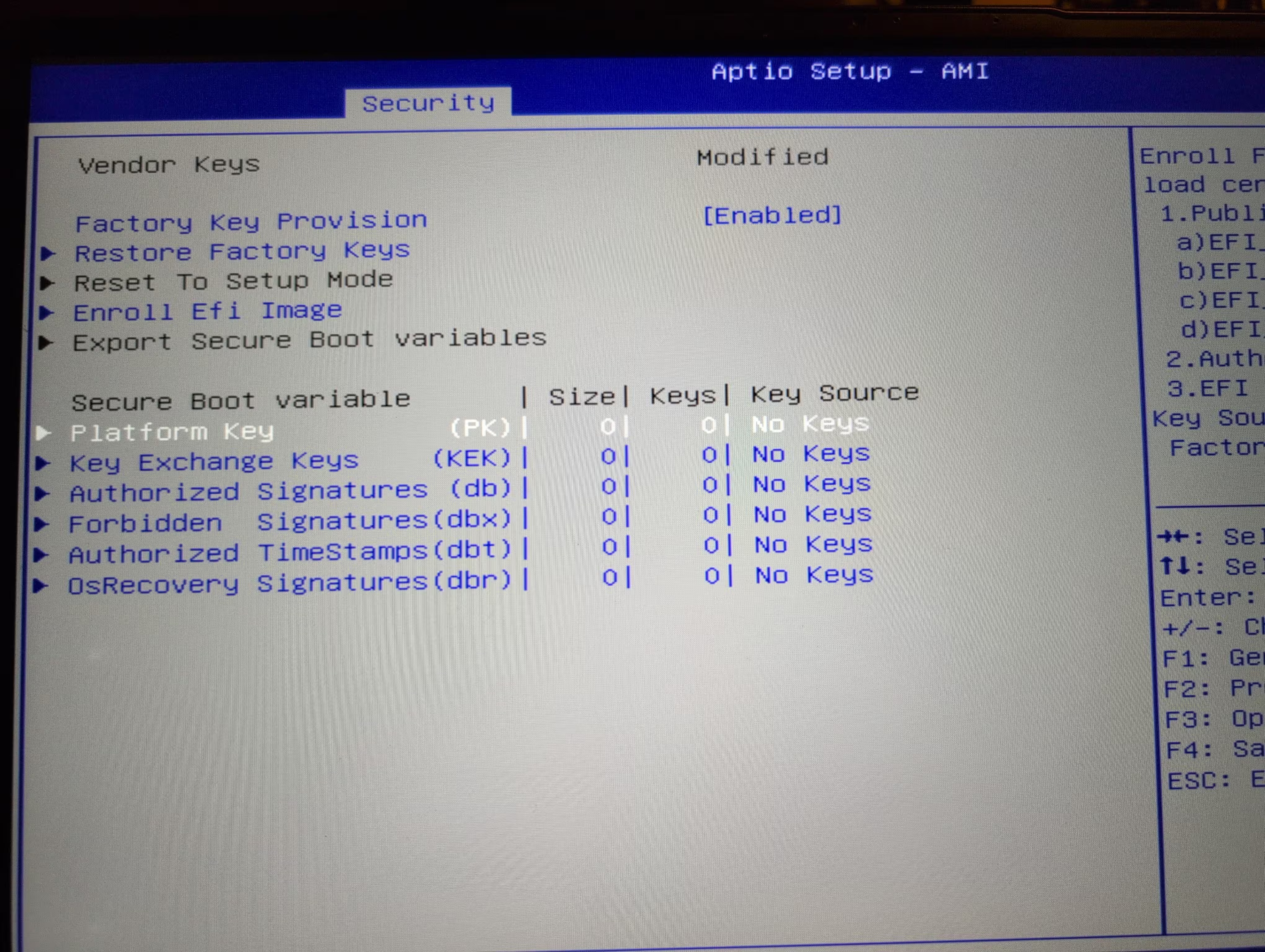
Using the "Enroll Efi Image", one can tell the firmware where to find the EFI partition. Next, we load the Platform Key from the EFI image. Here's what the screen should read after successfully setting the keys:
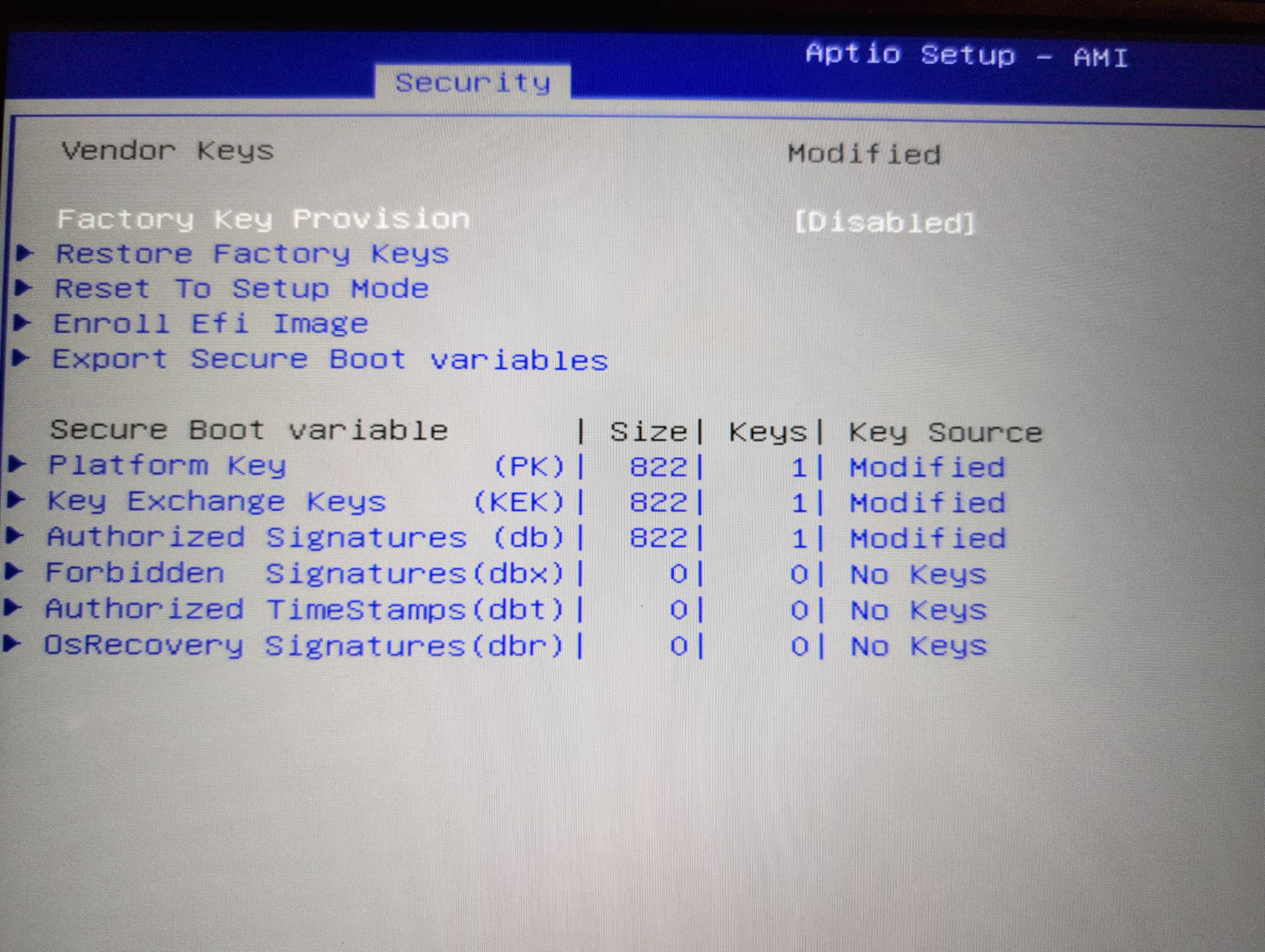
The core point is that I generated my own Platform Key, KEK, and db. I generated the keys on a secure OpenBSD machine and copied them by encrypted USB drive to the laptop.
In theory, time for first secure boot.
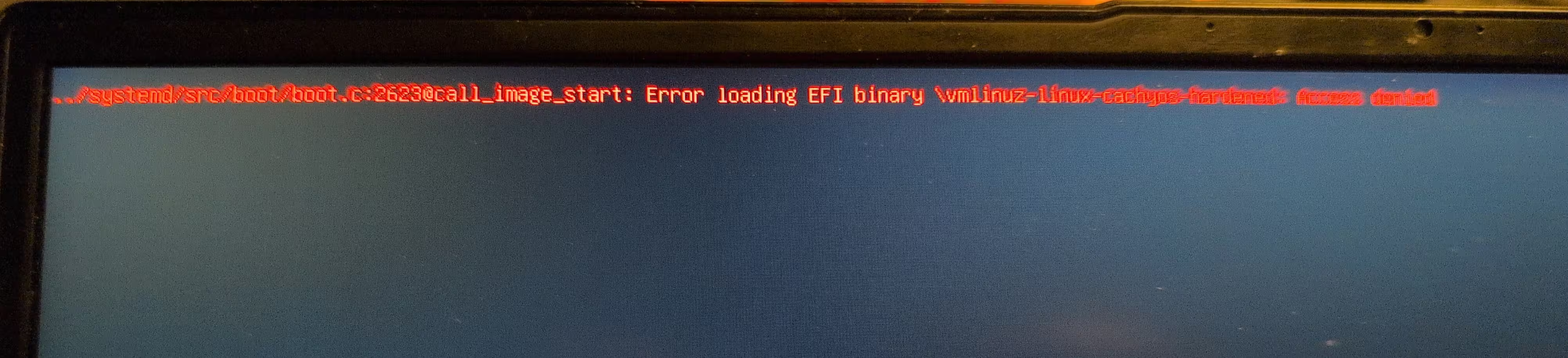
This is unexpected and confusing. What it reads is there is a permissions problem, which is accurate, just not file permissions as one may think. The kernel isn't signed with a key in the db, so it's the EFI boot loader telling you it can't boot the unsigned kernel. This is working as designed.
The answer is to disable secure boot, go back into the operating system, and sign the kernel with my generated Platform Keys.. Once the signed kernel is placed in the /boot partition, it should all work. For clarity, the signed kernel must be done with the PK, otherwise the whole chain of trust fails; and you arrive at this error message. Once that was fixed, I rebooted, re-enabled secure boot, and now for the second boot.
After authenticating and unlocking the OPAL2 drive, entering the password and token for the encrypted filesystem, we get into the system. Here's what this looks like:
sudo bootctl
System:
      Firmware: UEFI 2.80 (American Megatrends 5.29)
 Firmware Arch: x64
   Secure Boot: enabled (user)
  TPM2 Support: yes
  Measured UKI: yes
  Boot into FW: supported
There's also the inventory of what security functions are enabled:
sudo fwupdmgr security
Host Security ID: HSI:2 (v2.0.17)

HSI-1
✔ BIOS firmware updates:         Enabled
✔ Fused platform:                Locked
✔ Supported CPU:                 Valid
✔ TPM empty PCRs:                Valid
✔ TPM v2.0:                      Found
✔ UEFI bootservice variables:    Locked
✔ UEFI platform key:             Valid
✔ UEFI secure boot:              Enabled

HSI-2
✔ SPI write protection:          Enabled
✔ IOMMU:                         Enabled
✔ Platform debugging:            Locked
✔ TPM PCR0 reconstruction:       Valid

HSI-3
✔ CET Platform:                  Supported
✔ Pre-boot DMA protection:       Enabled
✔ Suspend-to-idle:               Enabled
✔ Suspend-to-ram:                Disabled
✘ SPI replay protection:         Disabled

HSI-4
✔ SMAP:                          Enabled
✘ Processor rollback protection: Disabled
✘ Encrypted RAM:                 Not supported

Runtime Suffix -!
✔ CET OS Support:                Supported
✔ fwupd plugins:                 Untainted
✔ Linux kernel lockdown:         Enabled
✔ Linux swap:                    Encrypted
✔ Linux kernel:                  Untainted
✔ UEFI db:                       Not found

Host Security Events
  2025-11-25 08:17:49:  ✔ UEFI db changed: Valid → Not found
  2025-11-25 08:17:49:  ✔ UEFI platform key changed: Invalid → Valid
  2025-11-25 08:17:49:  ✔ Secure Boot enabled
The system is now at level 2. The checkmarks on the left are what matters here. We passed 80% of level 3, but since the firmware doesn't support disabling SPI replay protection, we can't get there. As this is a consumer AMD Ryzen processor, we don't have encrypted RAM nor processor micocode rollback protection. The Ryzen PRO, Threadripper, and EPYC can do all this and achieve level 4 easily.
At level 4, most auditors assume the system is good and now you can begin setting up the TEE and begin confidential computing in the TEE.
Questionable Paranoia
It's at this point, I refer you back to the failed first boot. Did you notice something wrong?
The answer is to disable secure boot, go back into the operating system, and sign the kernel.
Yes, there is the problem. If you can boot a computer, go into the firmware, and disable secure boot, and get into the operating system, what's the point of secure boot?
Well, TEE and confidential computing configuration should not allow anything to run if we haven't at least passed the basic secure boot process to get to the running kernel.
Second, the way to close this gap is to enforce a firmware password, so without the password, you can't simply change the state of secure boot. Another layer of security here is the encrypted file system password and token requirement.
This also means every new kernel release, I have to make sure it is signed and setup in the boot partition correctly. Otherwise, I'll have to disable the secure boot, sign the kernel, reboot, enable secure boot, and get into the kernel. Such is life with confidential computing.