Seagate External Drive Teardown
TL;DR
I disassembled a 4TB Seagate external drive that had failed. The drive contains two 2TB drives connected via a custom dual-SATA controller emulating a RAID-0 array. Visit the full photoset: 2025 Seagate External Drive Teardown. I plan to identify the chips on the circuit board and conduct JTAG diagnostics as a future project.
The Problem
I used a 4TB eSATA external drive for system backups over the past eight to nine years. It was reliable and required no attention, connected via USB 3.0 with an ext4 filesystem. The restic backups functioned flawlessly, encrypting all data securely with daily, weekly, monthly, and annual snapshots that kept the drive nearly full for years.
In the past few months, the drive began clicking, causing it to disconnect from the USB subsystem; forcing a restart of the drive. Last weekend, it finally died. Every write caused endless errors. These log lines are not great:
[12071.427973] I/O error, dev sdb, sector 103672 op 0x0:(READ) flags 0x84700 phys_seg 128 prio class 3
[12071.427994] sd 1:0:0:0: [sdb] tag#24 FAILED Result: hostbyte=DID_ERROR driverbyte=DRIVER_OK cmd_age=32s
[12071.427997] sd 1:0:0:0: [sdb] tag#24 CDB: Read(16) 88 00 00 00 00 00 00 01 90 f8 00 00 04 00 00 00
[12071.427999] I/O error, dev sdb, sector 102648 op 0x0:(READ) flags 0x84700 phys_seg 128 prio class 3
While everything is encrypted, I still wanted to wipe the drive before giving it up. I couldn’t even do that. Both shred -uvz and dd if=/dev/zero of=/dev/sdb failed due to read and write errors, forcing frequent timeouts. The drive gets unusually hot to the touch; I didn’t use an infrared camera, but it’s clearly hot. I hoped disassembling and cooling it might let the drive survive long enough to wipe it. That didn’t work either.
Cooling the Drive
I peeled off the metal cover and am presented with this:
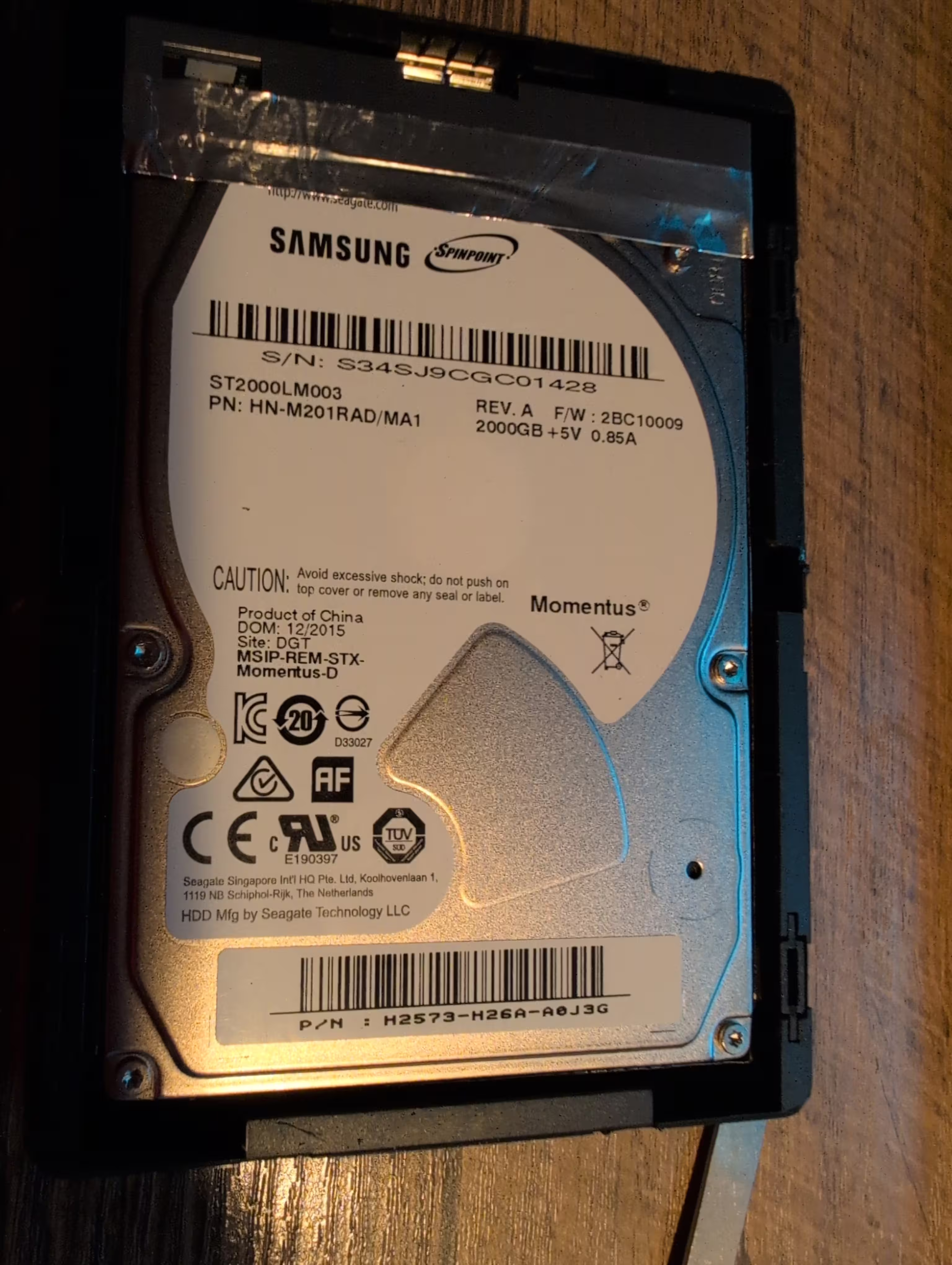
The astute reader will notice this is a Samsung drive, not a Seagate. And the drive is listed as 2000GB (2TB). This is not 4 TB drive as reported by the operating system. Odd. For a 2.5" drive, its thickness appears excessive, suggesting it houses two 2TB drives in a RAID 0 configuration to create a 4TB capacity. The Date of Manufacture(DOM) is December 2015, making it nearly 10 years old—older than the 8-9 year estimate I previously mentioned.
Removing the top allowed me to wipe the drive slightly better. It lasted roughly twice as long before the errors returned, accompanied by the familiar "click of death" sound. I’ve completed the teardown. The full photo set is available at https://photos.lewman.com/2025-Seagate-External-Drive-Teardown.
Complete Disassembly
In the end, it is two Samsung 2TB drives connected to a custom SATA board that is clearly running some firmware that presents a 4 TB drive to the operating system. Once the drives are apart, let's see what's failing.
lsusb reports the drive as: ID 0bc2:ab2a Seagate RSS LLC BUP Fast HDD to the system.
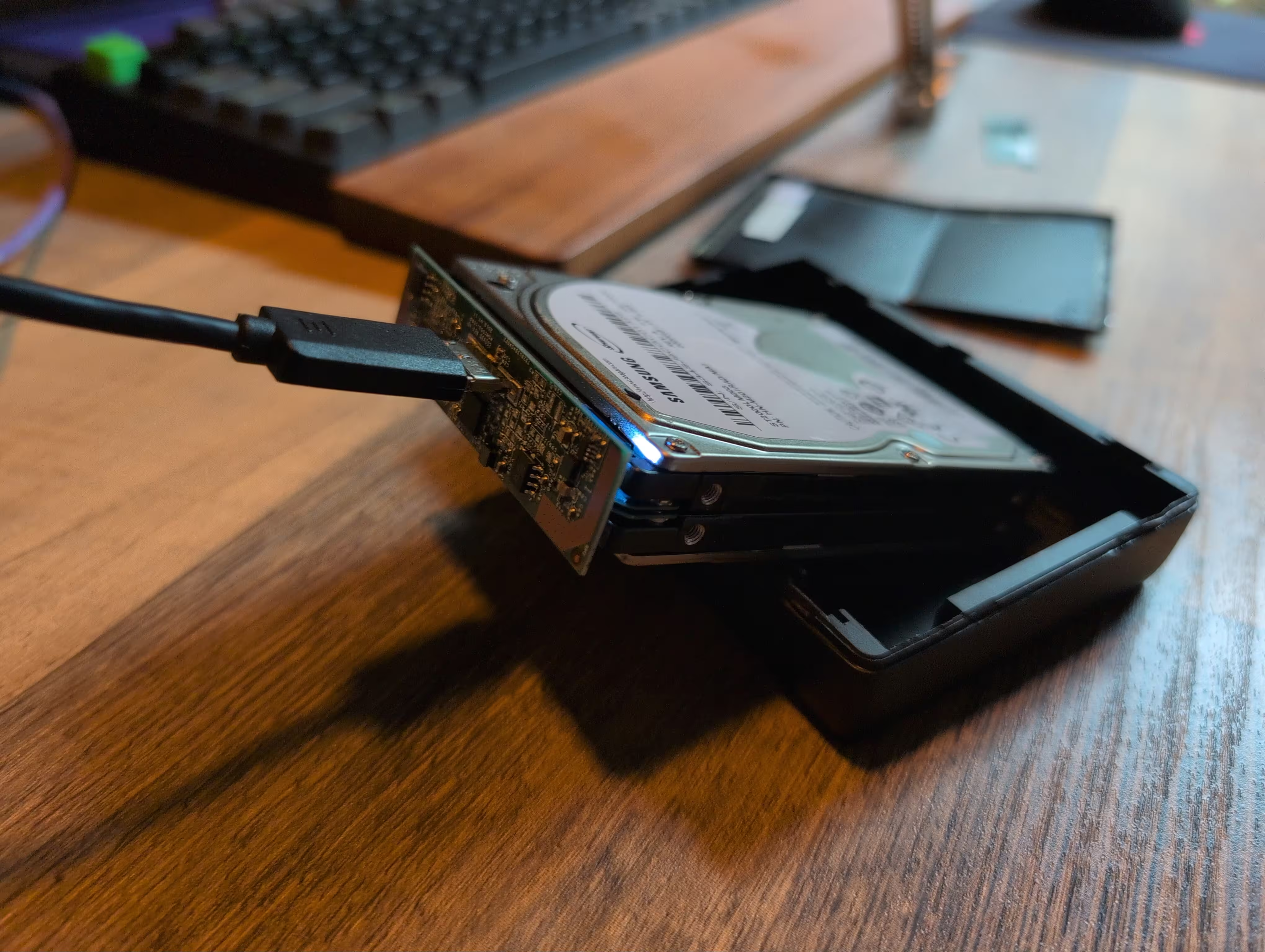
fdisk -l reports:
Disk /dev/sdb: 3.64 TiB, 4000797859328 bytes, 7814058319 sectors
Disk model: BUP Fast HDD
Units: sectors of 1 * 512 = 512 bytes
Sector size (logical/physical): 512 bytes / 4096 bytes
I/O size (minimum/optimal): 4096 bytes / 4096 bytes
Interestingly, when plugging just one drive in to the circuit board, it won't show anything to the system. I lack a SATA debugging cable, so I cannot see what's happening on the board. It looks like there may be contacts for JTAG for future debugging.
Plugging just one drive into a USB to SATA cable, fdisk -l reports:
Disk /dev/sdb: 1.82 TiB, 2000398934016 bytes, 3907029168 sectors
Disk model: ASMT1051
Units: sectors of 1 * 512 = 512 bytes
Sector size (logical/physical): 512 bytes / 4096 bytes
I/O size (minimum/optimal): 4096 bytes / 4096 bytes
I find it interesting there are no filesystems nor partitions defined on the drive. Is Seagate using raw writes to the drive or some low-level formatting not understood by fdisk?
smartctl -a for the top drive reports:
=== START OF INFORMATION SECTION ===
Model Family:     Seagate Samsung SpinPoint M9T
Device Model:     ST2000LM003 HN-M201RAD
Serial Number:    S34SJ9CGC01428
LU WWN Device Id: 5 0004cf 211746275
Firmware Version: 2BC10009
User Capacity:    2,000,398,934,016 bytes [2.00 TB]
Sector Sizes:     512 bytes logical, 4096 bytes physical
Rotation Rate:    5400 rpm
Form Factor:      2.5 inches
Device is:        In smartctl database 7.5/5706
ATA Version is:   ATA8-ACS T13/1699-D revision 6
SATA Version is:  SATA 3.0, 6.0 Gb/s (current: 6.0 Gb/s)
Local Time is:    Tue Nov 11 12:26:38 2025 PST
SMART support is: Available - device has SMART capability.
SMART support is: Enabled

=== START OF READ SMART DATA SECTION ===
SMART overall-health self-assessment test result: PASSED

SMART Attributes Data Structure revision number: 16
Vendor Specific SMART Attributes with Thresholds:
ID# ATTRIBUTE_NAME          FLAG     VALUE WORST THRESH TYPE      UPDATED  WHEN_FAILED RAW_VALUE
  1 Raw_Read_Error_Rate     0x002f   100   100   051    Pre-fail  Always       -       5
  2 Throughput_Performance  0x0026   252   252   000    Old_age   Always       -       0
  3 Spin_Up_Time            0x0023   087   087   025    Pre-fail  Always       -       4111
  4 Start_Stop_Count        0x0032   098   098   000    Old_age   Always       -       2199
  5 Reallocated_Sector_Ct   0x0033   252   252   010    Pre-fail  Always       -       0
  7 Seek_Error_Rate         0x002e   252   252   051    Old_age   Always       -       0
  8 Seek_Time_Performance   0x0024   252   252   015    Old_age   Offline      -       0
  9 Power_On_Hours          0x0032   100   100   000    Old_age   Always       -       6615
 10 Spin_Retry_Count        0x0032   252   252   051    Old_age   Always       -       0
 12 Power_Cycle_Count       0x0032   100   100   000    Old_age   Always       -       983
191 G-Sense_Error_Rate      0x0022   100   100   000    Old_age   Always       -       9
192 Power-Off_Retract_Count 0x0022   252   252   000    Old_age   Always       -       0
194 Temperature_Celsius     0x0002   064   055   000    Old_age   Always       -       29 (Min/Max 17/67)
195 Hardware_ECC_Recovered  0x003a   100   100   000    Old_age   Always       -       0
196 Reallocated_Event_Count 0x0032   252   252   000    Old_age   Always       -       0
197 Current_Pending_Sector  0x0032   252   252   000    Old_age   Always       -       0
198 Offline_Uncorrectable   0x0030   252   252   000    Old_age   Offline      -       0
199 UDMA_CRC_Error_Count    0x0036   200   200   000    Old_age   Always       -       0
200 Multi_Zone_Error_Rate   0x002a   100   100   000    Old_age   Always       -       137
223 Load_Retry_Count        0x0032   100   100   000    Old_age   Always       -       24
225 Load_Cycle_Count        0x0032   095   095   000    Old_age   Always       -       53540
241 Total_LBAs_Written      0x0032   098   089   000    Old_age   Always       -       3809631
242 Total_LBAs_Read         0x0032   094   092   000    Old_age   Always       -       8792877

SMART Error Log Version: 1
No Errors Logged

SMART Self-test log structure revision number 1
Num  Test_Description    Status                  Remaining  LifeTime(hours)  LBA_of_first_error
# 1  Extended offline    Aborted by host               90%      6615         -
# 2  Short offline       Completed without error       00%      6615         -
# 3  Short offline       Completed without error       00%      6615         -
# 4  Short offline       Interrupted (host reset)      90%      6615         -
# 5  Short offline       Completed without error       00%      1572         -
# 6  Short offline       Completed without error       00%      1572         -
smartctl -a for the bottom drive reports:
=== START OF INFORMATION SECTION ===
Model Family:     Seagate Samsung SpinPoint M9T
Device Model:     ST2000LM003 HN-M201RAD
Serial Number:    S34SJ9CGC00534
LU WWN Device Id: 5 0004cf 2116c558f
Firmware Version: 2BC10009
User Capacity:    2,000,398,934,016 bytes [2.00 TB]
Sector Sizes:     512 bytes logical, 4096 bytes physical
Rotation Rate:    5400 rpm
Form Factor:      2.5 inches
Device is:        In smartctl database 7.5/5706
ATA Version is:   ATA8-ACS T13/1699-D revision 6
SATA Version is:  SATA 3.0, 6.0 Gb/s (current: 6.0 Gb/s)
Local Time is:    Tue Nov 11 12:28:35 2025 PST
SMART support is: Available - device has SMART capability.
SMART support is: Enabled

=== START OF READ SMART DATA SECTION ===
SMART overall-health self-assessment test result:
SMART Attributes Data Structure revision number: 16
Vendor Specific SMART Attributes with Thresholds:
ID# ATTRIBUTE_NAME          FLAG     VALUE WORST THRESH TYPE      UPDATED  WHEN_FAILED RAW_VALUE
  1 Raw_Read_Error_Rate     0x002f   100   100   051    Pre-fail  Always       -       1
  2 Throughput_Performance  0x0026   252   252   000    Old_age   Always       -       0
  3 Spin_Up_Time            0x0023   087   083   025    Pre-fail  Always       -       3995
  4 Start_Stop_Count        0x0032   098   098   000    Old_age   Always       -       2381
  5 Reallocated_Sector_Ct   0x0033   252   252   010    Pre-fail  Always       -       0
  7 Seek_Error_Rate         0x002e   252   252   051    Old_age   Always       -       0
  8 Seek_Time_Performance   0x0024   252   252   015    Old_age   Offline      -       0
  9 Power_On_Hours          0x0032   100   100   000    Old_age   Always       -       6628
 10 Spin_Retry_Count        0x0032   252   252   051    Old_age   Always       -       0
 12 Power_Cycle_Count       0x0032   100   100   000    Old_age   Always       -       939
191 G-Sense_Error_Rate      0x0022   100   100   000    Old_age   Always       -       22
192 Power-Off_Retract_Count 0x0022   252   252   000    Old_age   Always       -       0
194 Temperature_Celsius     0x0002   064   055   000    Old_age   Always       -       27 (Min/Max 16/68)
195 Hardware_ECC_Recovered  0x003a   100   100   000    Old_age   Always       -       0
196 Reallocated_Event_Count 0x0032   252   252   000    Old_age   Always       -       0
197 Current_Pending_Sector  0x0032   252   252   000    Old_age   Always       -       0
198 Offline_Uncorrectable   0x0030   252   252   000    Old_age   Offline      -       0
199 UDMA_CRC_Error_Count    0x0036   200   200   000    Old_age   Always       -       0
200 Multi_Zone_Error_Rate   0x002a   100   100   000    Old_age   Always       -       117
223 Load_Retry_Count        0x0032   100   100   000    Old_age   Always       -       12
225 Load_Cycle_Count        0x0032   095   095   000    Old_age   Always       -       52464
241 Total_LBAs_Written      0x0032   095   095   000    Old_age   Always       -       7739877
242 Total_LBAs_Read         0x0032   098   093   000    Old_age   Always       -       3484081

SMART Error Log Version: 1
No Errors Logged

SMART Self-test log structure revision number 1
Num  Test_Description    Status                  Remaining  LifeTime(hours)  LBA_of_first_error
# 1  Extended offline    Aborted by host               90%      6628         -
# 2  Short offline       Completed without error       00%      6628         -
# 3  Short offline       Completed without error       00%      6628         -
# 4  Short offline       Interrupted (host reset)      30%      6628         -
# 5  Short offline       Completed without error       00%      1585         -
# 6  Short offline       Completed without error       00%      1585         -
The SMART output is interesting in a few ways. First, the drives both passed the internal tests. Second, the drives have different "Power_On_Hours" and "Power_Cycle_Count". Odd. The difference is not due to my testing, as the results were taken within minutes of each other. And third, both drives report "Pre-fail".
I then ran badblocks -wsv /dev/sdb on each drive. It took about 5 hours to test each drive. Nothing failed, at all. Each drive works fine through the entire test; reads and writes. I plug both drives back into the SATA circuit board and they fail almost immediately with the click of death. Clearly the drives are fine, but maybe the circuit board is the issue.
Next Steps
It appears I have two good 2TB drives. I'm going to get a couple of USB3 to eSATA external drive enclosures and keep using the drives until they actually fail. And yes, this is complete overkill for a $200 10-year old set of drives. However, curiosity got the best of me. I plan to try the JTAG ports and see if I can pull the firmware off the board to reverse engineer it for the sake of curiosity.